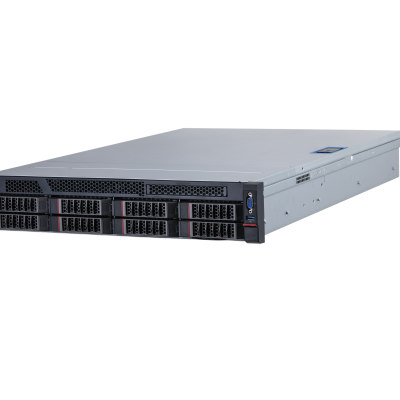
| System |
| Main Processor | 2 × 10 cores and 20 thread 86 processors, 2.2 GHz |
| Operating System | CentOS Linux release 7.4.1708 (Core) |
| Intelligence Analysis Card | 4 intelligent analysis cards |
| Memory | 4 × 16 GB DDR4 memory modules, maximum 24 slots |
| Disk | 1 × 128 GB 2.5-inch SSD and 2 × 4 TB 3.5-inch HDDs with up to 8 slots. 7.2K RPM SATA 6 Gbps 512N 3.5-inch |
| RAID | Supports RAID cards |
| Event Detection in Controlled Place |
| Tripwire | An alarm is triggered when the rules are met for tripwire. 1. Intelligent Configuration • Algorithms are used to configure parameters, and determine the detection range and optimal default values. • Only supports setting people as the default type for tripwire. This default is not a configurable option. • The location for triggering alarms can be configured as center, left center, top center, right center, bottom center, top left vertex, top right vertex, bottom left vertex, and bottom right vertex. The default value is center. • The direction for triggering alarms can be set as A -> B, B -> A, or A<->B. 2. Alarm Details • Alarm information: Device, channel, alarm time, algorithm name, task name, alarm name,rules for detection zone, target box, alarm image and alarm videos. |
| Intrusion | An alarm is triggered when the rules are met for intrusion. 1. Intelligent Configuration • Algorithms are used to configure parameters, and determine the detection range and optimal default values. • It only supports setting people as the object type. This default is not a configurable option. • The rule action list can be configured as within area and crossing area. The default value is center. • The detection direction is supported when crossing area is selected. You can set entering area or leaving area. The default value is entering area. You can select both of options or just one of them. 2. Intelligent Configuration 1) Within Area Option • First alarm time. Range: 1–600 sec, 3 sec by default. • Repeated alarm suppression. Range: 0–600 sec, 0 sec by default. When the value is 0, all repeated alarms will be suppressed. • Minimum number of targets: 1, and the field is set as 1 by default. The minimum number of targets cannot exceed the maximum number of targets. • Maximum number of targets: 20, and the field is set as 5 by default. 2) General • Sensitivity. Range: 1–10, 5 sec by default. • Shapes with up to 20 sides can be used for the rule area. 3. Alarm Details • Alarm information: Device, channel, alarm time, algorithm name, task name, alarm name, rules for detection zone, target box, alarm image and alarm videos. • Image overlay: Target box and rules for detection zone. |
| Climbing Detection | An alarm is triggered when the body crosses the threshold in the detection area. 1. Intelligent Configuration • Algorithms are used to configure parameters, and determine the detection range and optimal default values. • First alarm time. Range: 1–300 sec, 1 sec by default. • Sensitivity. Range: 1–10, 5 by default. • Supports up to 20 rule liness. • Up to 10 independent alarm lines can be set for each scene. 2. Alarm details • Alarm information: Device, channel, alarm time, algorithm name, task name, alarm name, rules for detection zone, target box, alarm image and alarm videos. • Image overlay: Target box and rule liness. |
| Getting up Detection | An alarm is triggered when people get up during the arming time. It is suitable for bedtime in scenes with open floor layout beds, but not for bunk beds. 1. Intelligent Configuration • Algorithms are used to configure parameters, and determine the detection range and optimal default values. • 4 sided shapes can be used to set the detection area for getting up detection. • The detection line and its direction must be set for sleeping for each area. It must cover the range of a person's full body from head to foot. • Up to 10 independent detection areas can be set for each scene. • The bed must be vertically oriented to the camera monitoring direction for the scene. • Single-layer beds are supported, but upper and lower bunks are not. 2. Alarm Details • Alarm information: Device, channel, alarm time, algorithm name, task name, alarm name, rule liness, target box, alarm image and alarm videos. • Image overlay: Target box and rules for the detection zone. |
| Stay (Loitering) Detection | Detects when a person loiters in the detection area, and triggers alarms when they remain there for longer than the defined threshold. 1. Intelligent Configuration • Algorithms are used to configure parameters, and determine the detection range and optimal default values. • First alarm time. Range: 1–3,600 sec, 5 sec by default. • Repeated alarm suppression. Range: 0–3,600 sec, 0 s by default. When the value is 0, all repeated alarms will be suppressed. • Sensitivity. Range: 1–10, 5 by default. • Shapes with up to 20 sides can be used for the rule area. • Up to 10 independent rules can be set for each scene. 2. Alarm details • Alarm information: Device, channel, alarm time, algorithm name, task name, alarm name, rules for the detection zone, target box, alarm image and alarm videos. • Image overlay: Target box and rules for the detection zone. |
| Sleep Detection | Detects when a person is lying on the table, and triggers alarms when they remain there for longer than the defined threshold. 1. Intelligent Configuration • Algorithms are used to configure parameters, and determine the detection range and optimal default values. • First alarm time. Range: 1–3,600 sec, 600 sec by default. • Repeated alarm suppression. Range: 0–3,600 sec, 0 sec by default. When the value is 0, all repeated alarms will be suppressed. • Triggers alarms when a person sits still and lays on the table. You can select both of them. • Shapes with up to 20 sides can be used for the rule area. • Up to 10 independent rules can be set for each scene. 2. Alarm Details • Alarm information: Device, channel, alarm time, algorithm name, task name, alarm name, rules for the detection zone, target box, alarm image and alarm videos. • Image overlay: Target box and rules for the detection zone. |
| Abnormal Number of People Detection | An alarm is triggered when the rules are met for abnormal number of people detection. 1. Intelligent Configuration • Algorithms are used to configure parameters, and determine the detection range and optimal default values. • First alarm time. Range: 1–3,600 sec, 3 sec by default. • Repeated alarm suppression. Range: 0–3,600 sec, 0 sec by default. When the value is 0, all repeated alarms will be suppressed. • Rules can be set for the threshold such as equal to, not equal to, less than, greater than, within range (including boundary values) and outside the range (not including boundary values). You can also choose real-time people counting. • People threshold. Range. 0–20 persons, 10 persons by default. • Boundary value. Range. 0–20 persons, 5–10 persons by default. • Sensitivity. Range: 1–10 sec, 5 sec by default. • Shapes with up to 20 sides can be used for the rule area. 2. Alarm Details • Alarm information: Device, channel, alarm time, algorithm name, task name, alarm name, rules for the detection zone, target box, alarm image and alarm videos. • Image overlay: Target box and rules for the detection zone. |
| Abnormal Sound Detection | An alarm is triggered when the sound exceeds the define threshold. Only PCM decoding format is supported. 1. Intelligent Configuration • Algorithms are used to configure parameters, and determine the detection range and optimal default values. • Abnormal sound range. 1–90 dB, 70 dB by default. • First alarm time. Range: 1,000–3,000 ms, 2,000 ms by default. • After you configure the detection rules for abnormal sounds, the client displays the sound intensity decibel value of the video channel in real time. • One rule can be set for each scene. 2. Alarm Details • Alarm information: Device, channel, alarm time, algorithm name, task name, alarm name, alarm image and alarm videos without the red alarm box. • Image overlay: Target box and rule lines. |
| Fighting | An alarm is triggered when 2 or more people fight in the detection area. 1. Configuration parameters and algorithm determination range for the algorithm: • Sensitivity. Range: 1–10, 7 by default. • Shapes with up to 20 sides can be used for the rule area. • One rule can be set for each scene. 2. Alarm details • Alarm information: Device, channel, alarm time, algorithm name, task name, alarm name, rules for detection zone., target box, alarm image and alarm videos. • Image overlay: Target box and rules for detection zone. |
| Crowd Gathering | An alarm is triggered when 4 or more people gather from any of the four directions towards one central point for longer than the defined threshold. 1. Intelligent Configuration • Algorithms are used to configure parameters, and determine the detection range and optimal default values. • First alarm time. Range: 1–300 sec, 6 sec by default. • Repeated alarm suppression. Range: 0–3,600 sec, 0 sec by default. When the value is 0, all repeated alarms will be suppressed. • Sensitivity. Range: 1–10, 5 by default. • Shapes with up to 20 sides can be used for the rule area. 2. Alarm Details • Alarm information: Device, channel, alarm time, algorithm name, task name, alarm name, rules for the detection zone, target box, alarm image and alarm videos. • Image overlay: Target box and rules for the detection zone. |
| Object Detection | An alarm is triggered when an object is left unattended, remains stationary without any individuals nearby, or when it is moved from its original position or the rule area for a period of time surpassing the defined threshold. 1. Intelligent Configuration • Algorithms are used to configure parameters, and determine the detection range and optimal default values. • First alarm time. Range: 1–300 sec, 6 sec by default. • Repeated alarm suppression. Range: 0–3,600 sec, 0 sec by default. When the value is 0, all repeated alarms will be suppressed. • Sensitivity. Range: 1–10, 10 by default. • Shapes with up to 20 sides can be used for the rule area. • The options are abandoned object and object removal. The default value is abandoned object. You can select both options or just one of them. • Shapes with up to 20 sides can be used for the rule area. • Up to 8 independent detection areas can be set for each scene. • Experience databases can be registered, this includes the false alarm database. 2. Alarm Details • Alarm information: Device, channel, alarm time, algorithm name, task name, the object removal and abandoned object alarm names, rules for the detection zone, target box, alarm image and alarm videos. • Image overlay: Target box and rules for the detection zone. |
| Call Detection | Detects when a person is on a call, and triggers alarms when they remain on the call for longer than the defined threshold. 1. Intelligent Configuration • Algorithms are used to configure parameters, and determine the detection range and optimal default values. • First alarm time. Range: 1–300 sec, 10 sec by default. • Repeated alarm suppression. Range: 0–3,600 sec, 0 by default. When the value is 0, all repeated alarms will be suppressed. • Sensitivity. Range: 1–10, 5 by default. • Shapes with up to 20 sides can be used for the rule area. 2. Alarm details • Alarm information: Device, channel, alarm time, algorithm name, task name, alarm name, rules for detection zone, target box, alarm image and alarm videos. • Image overlay: Target box and rules for detection zone. |
| Using Mobile Phone | Detects when a person uses their phone, and triggers alarms when they use it for longer than the defined threshold. 1. Intelligent Configuration • Algorithms are used to configure parameters, and determine the detection range and optimal default values. • First alarm time. Range: 1–300 sec, 10 sec by default. • Repeated alarm suppression. Range: 0–3,600 sec, 0 sec by default. When the value is 0, all repeated alarms will be suppressed. • Sensitivity. Range: 1–10, 5 by default. • Shapes with up to 20 sides can be used for the rule area. 2. Alarm details • Alarm information: Device, channel, alarm time, algorithm name, task name, alarm name, rules for detection zone, target box, alarm image and alarm videos. • Image overlay: Target box and rules for detection zone. |
| Fall Detection | Detects when a person squats or falls to the ground, and triggers alarms when they remain there for longer than the defined threshold. 1. Intelligent Configuration • Algorithms are used to configure parameters, and determine the detection range and optimal default values. • First alarm time. Range: 1–300 sec, 10 sec by default. • Repeated alarm suppression. Range: 0–3,600 sec, 0 sec by default. When the value is 0, all repeated alarms will be suppressed. • Sensitivity. Range: 1–10, 5 by default. • Shapes with up to 20 sides can be used for the rule area. 2. Alarm details • Alarm information: Device, channel, alarm time, algorithm name, task name, alarm name, rule liness, target box, alarm image and alarm videos. • Image overlay: Target box and rules for the detection zone. |
| Running Detection | An alarm is triggered when people run in the detection area for longer than the defined threshold. 1. Intelligent Configuration • Algorithms are used to configure parameters, and determine the detection range and optimal default values. • Repeated alarm suppression. Range: 0–3,600 sec, 0 sec by default. When the value is 0, all repeated alarms will be suppressed. • Sensitivity. Range: 1–10, 5 by default. • Shapes with up to 20 sides can be used for the rule area. 2. Alarm details • Alarm information: Device, channel, alarm time, algorithm name, task name, alarm name, rule lines, target box, alarm image and alarm videos. • Image overlay: Target box and rules for detection zone. |
| Smoking Detection | Detects when a person holds a cigarette in their hand or the cigarette is in their mouth. It triggers alarms when they smoke for longer than the defined threshold. 1. Intelligent Configuration • Algorithms are used to configure parameters, and determine the detection range and optimal default values. • First alarm time. Range: 1–300 sec, 30 by default. • Repeated alarm suppression. Range: 0–3,600 sec, 0 by default. When the value is 0, all repeated alarms will be suppressed. • Sensitivity. Range: 1–10, 5 by default. It will be easy to be detected when the value is greater, resullting more false alarms. • Shapes with up to 20 sides can be used for the rule area. 2. Alarm details • Alarm information: Device, channel, alarm time, algorithm name, task name, alarm name, rules for detection zone, target box, alarm image and alarm videos. • Image overlay: Target box and rules for detection zone. |
| Sleeping with Quilt Covering Head | An alarm will be triggered when a person sleeps with the quilt covering their head in the detection area. This function is only supported in single rooms with one person in them. 1. Intelligent Configuration • Algorithms are used to configure parameters, and determine the detection range and optimal default values. • First alarm time. Range: 1–3,600 sec, 5 sec by default. • Repeated alarm suppression. Range: 0–3,600 sec, 0 sec by default. When the value is 0, all repeated alarms will be suppressed. • Sensitivity. Range: 1–10, 5 by default. It will be easy to be detected when the value is greater, resullting more false alarms. • Shapes with up to 20 sides can be used for the rule area. • Up to 10 independent rules can be set for the same scene. 2. Alarm details • Alarm information: Device, channel, alarm time, algorithm name, task name, alarm name, rule liness, target box, alarm image and alarm videos. • Image overlay: Target box and rules for detection zone. |
| Banging Head on Wall | An alarm will be triggered when a person bangs their head on the wall. This function is only supported in single rooms with one person in them. 1. Intelligent Configuration • Algorithms are used to configure parameters, and determine the detection range and optimal default values. • First alarm time. Range: 1–300 sec, 5 sec by default. • Repeated alarm suppression. Range: 0–3,600 sec, 0 sec by default. When the value is 0, all repeated alarms will be suppressed. • Sensitivity. Range: 1–10, 5 by default. It will be easy to be detected when the value is greater, resullting more false alarms. • Shapes with up to 20 sides can be used for the rule area. • Up to 10 independent rules can be set for each scene. 2. Alarm details • Alarm information: Device, channel, alarm time, algorithm name, task name, alarm name, rule liness, target box, alarm image and alarm videos. • Image overlay: Target box and rules for detection zone. |
| Abnormal Number of People in the Interrogation Room Detection | An alarm will be triggered when the ratio of officers to prisoners in the interrogation room does not conform to defined values. 1. Intelligent Configuration • Algorithms are used to configure parameters, and determine the detection range and optimal default values. • First alarm time. Range: 1–3,600 sec, 5 sec by default. • Repeated alarm suppression. Range: 0–3,600 sec, 0 sec by default. When the value is 0, all repeated alarms will be suppressed. • Sensitivity. Range: 1–10, 5 by default. • Waiting time. Range: 1–3,600 sec, 5 sec by default. • 2 detection areas can be added. There are 4 detection options: Equal to the threshold, not equal to the threshold, more than the threshold, and less than the threshold. The default value is equal to the threshold. The threshold range is 0–80, and is 5 by default. You can delete items. • Shapes with up to 20 sides can be used for the rule area. 2. Alarm details • Alarm information: Device, channel, alarm time, algorithm name, task name, alarm name, rule liness, target box, alarm image and alarm videos. • Image overlay: Target box and rules for detection zone. |
| Abnormal Ratio of the Police and Escorted Persons Detection | An alarm will be triggered when the ratio of custody officers and prisoners doesn't conform to defined values. 1. Intelligent Configuration • Algorithms are used to configure parameters, and determine the detection range and optimal default values. • First alarm time. Range: 1–3,600 sec, 2 sec by default. • Repeated alarm suppression. Range: 0–3,600 sec, 0 sec by default. When the value is 0, all repeated alarms will be suppressed. • Sensitivity. Range: 1–10, 5 by default. It will be easy to be detected when the value is greater, resullting more false alarms. • Custody police can be added and prisoners can be counted. The range for prisoner count is 0–100, and is 1 by default. There are 5 comparison options: more than, less than, equal to, not equal to and invalid. The default value is more than. • Shapes with up to 20 sides can be used for the rule area. 2. Alarm details • Alarm information: Device, channel, alarm time, task name, alarm name, algorithm name, rule liness, target box, alarm image and alarm videos. • Image overlay: Target box and rules for detection zone. |
| Not Wearing Face Mask Detection | An alarm will be triggered when people don't wear face mask for longer than the defined threshold. 1. Intelligent Configuration • Algorithms are used to configure parameters, and determine the detection range and optimal default values. • First alarm time. Range: 1–300 sec, 2 sec by default. • Repeated alarm suppression. Range: 0–3,600 sec, 0 sec by default. When the value is 0, all repeated alarms will be suppressed. • Sensitivity. Range: 1–10, 5 by default. • Shapes with up to 20 sides can be used for the rule area. 2. Alarm details • Alarm information: Device, channel, alarm time, task name, alarm name, algorithm name, rule liness, target box, alarm image and alarm videos. • Image overlay: Target box and rules for detection zone. |
| Not Wearing Protection Suit Detection | Detects when peope do not wear protection suits, and triggers alarms when they do so for longer than the defined threshold. 1. Intelligent Configuration • Algorithms are used to configure parameters, and determine the detection range and optimal default values. • First alarm time. Range: 1–3,600 sec, 2 sec by default. • Repeated alarm suppression. Range: 0–3,600 sec, 0 sec by default. When the value is 0, all repeated alarms will be suppressed. • Sensitivity. Range: 1–10, 5 by default. • Alarms will be triggered when the requirements are met or not met. • Shapes with up to 20 sides can be used for the rule area. • Registering in the experience database (True alarm database). 2. Alarm details • Alarm information: Device, channel, alarm time, task name, alarm name, algorithm name, rule liness, target box, alarm image and alarm videos. • Image overlay: Target box and rules for detection zone. |
| Standing Detection | An alarm will be triggered when pepole get up in the detection area. 1. Intelligent Configuration • Algorithms are used to configure parameters, and determine the detection range and optimal default values. • First alarm time. Range: 1–300 sec, 1 sec by default. • Repeated alarm suppression. Range: 0–3,600 sec, 0 sec by default. When the value is 0, all repeated alarms will be suppressed. • Sensitivity. Range: 1–10, 5 by default. • Shapes with up to 20 sides can be used for the rule area. 2. Alarm details • Alarm information: Device, channel, alarm time, task name, alarm name, algorithm name, rule liness, target box, alarm image and alarm videos. • Image overlay: Target box and rules for detection zone. |
| Hands Up for Help Detection | An alarm will be triggered when people wave their hands for longer than the defined threshold. 1. Intelligent Configuration • Algorithms are used to configure parameters, and determine the detection range and optimal default values. • First alarm time. Range: 1–300 sec, 2 sec by default. • Repeated alarm suppression. Range: 0–3,600 sec, 0 sec by default. When the value is 0, all repeated alarms will be suppressed. • Sensitivity. Range: 1–10, 7 by default. • Shapes with up to 20 sides can be used for the rule area. 2. Alarm details • Alarm information: Device, channel, alarm time, task name, alarm name, algorithm name, rule liness, target box, alarm image and alarm videos. • Image overlay: Target box and rules for detection zone. |
| Bi-directional People Counting | Supports bidirectional people counting in the detection area. 1. Intelligent Configuration • Algorithms are used to configure parameters, and determine the detection range and optimal default values. • Information is provided on the number of people entering and exiting the area, and those inside the area. • Live videos are produced and people flow data is generated on the client. The information is cleared at 00:00 every day by default. • Analysis results can be viewed on the client in real time. • People flow data can be manually reset. • If the operator restarts due to an anomaly, the OSD will not reset and the people flow data will continue to be accumulated. • Shapes with up to 20 sides can be used for the rule area. • Up to 32 points can be used when drawing the tripwire line within the rule area. • 1 rule can be set for each scene. • Direction lines are automatically generated that are perpendicular to the tripwire line from the start coordinate point to the next coordinate point. The line points from the left side of the line to the right side of the line. Each segment of the broken line shows a direction line. • Offers people flow data in real time and specially generates data from the last minute. |
| Passing Object through Window Detection | An alarm will be triggered when people pass objects through the window for longer than the defined threshold. 1. Intelligent Configuration • Algorithms are used to configure parameters, and determine the detection range and optimal default values. • Sensitivity. Range: 1–10, 5 by default. • Shapes with up to 20 sides can be used for the rule area. 2. Alarm details • Alarm information: Device, channel, alarm time, algorithm name, task name, alarm name, rules for detection zone, target box, alarm image and alarm videos. • Image overlay: Target box and rules for detection zone. |
| Taking Pictures Detection | An alarm will be triggered when people take snapshots in the detection area. 1. Intelligent Configuration • Algorithms are used to configure parameters, and determine the detection range and optimal default values. • First alarm time. Range: 1–300 sec, 10 sec by default. • Repeated alarm suppression. Range: 0–3,600 sec, 0 sec by default. When the value is 0, all repeated alarms will be suppressed. • Sensitivity. Range: 1–10, 5 by default. • Shapes with up to 20 sides can be used for the rule area. 2. Alarm details • Alarm information: Device, channel, alarm time, task name, alarm name, algorithm name, rule lines, target box, alarm image and alarm videos. • Image overlay: Target box and rule lines. |
| Performance of Event Detection in Controlled Place |
| Camera Access | Interrogation Room Scene Algorithm: Supports analysis of 64-channel of 2/4MP or 32-channel 8MP (20 rules can be configured for each channel) for following algorithms detection: Abnormal Number of People, Sleeping with Quilt Covering Head, Banging Head on Wall, Calling, Using mobile phone, Staying (Loitering), Falling, and Taking Pictures. Hall Scene Algorithm: Supports analysis of 64-channel of 2/4MP or 32-channel 8MP (20 rules can be configured for each channel) for following algorithms detection: Crowd Gathering, Object Detection, Falling, Running, Staying (Loitering), Taking Pictures. Support 32-channel of 2/4MP or 16-channel of 8MP of Fighting Detection. Duty Room Scene Algorithm: Supports analysis of 64-channel of 2/4MP or 32-channel 8MP (20 rules can be configured for each channel) for following algorithms detection: Sleep, Abnormal Number of People, Using Mobile Phone, Calling. Support 32-channel of 2/4MP or 16-channel of 8MP of Smoking Detection. Prison Cell Scene Algorithm: Supports analysis of 64-channel of 2/4MP or 32-channel 8MP (20 rules can be configured for each channel) for following algorithms detection: Abnormal Number of People, Climbing, Getting up, Sleeping with Quilt Covering Head, Staying (loitering), Crowd Gathering. Support 32-channel of 2/4MP or 16-channel of 8MP of Fighting Detection. |
| Application of Event Detection in Controlled Place |
| Scenario Type | Widely applicable to indoor scenes such as prisons and detention centers for various types of facilities. |
| Camera Installation Method | Inclined mount |
| Camera Installation Height | 3 m–5 m (9.84 ft–16.40 ft) |
| Resolution | 720p and above |
| Port |
| Network Port | 2 × 10,000/1,000 Mbps self-adaptive network ports |
| USB | 2 front USB 3.0 ports and 3 rear USB 3.0 ports |
| VGA | 2 × VGA ports |
| DVI | 1 |
| PCIe | 8 × standard PCle card slots |
| Others | 1 × RJ-45 management network ports |
| General |
| Power Supply | 100–127/200–240 VAC, 50/60 Hz, 10/5 A |
| Power Redundancy | Dual |
| Power Consumption | ≤800 W |
| Operating Temperature | +10 °C to +35 °C (+50 °F to +95 °F) |
| Operating Humidity | 10%–90% (RH), non-condensing |
| Storage Temperature | –40 °C to +60 °C (–40 °F to +140 °F) |
| Storage Humidity | 5%–95% (RH), non-condensing |
| Gross Weight | 35 kg (77.16 lb) |
| Net Weight | 27.5 kg (60.63 lb) |
| Product Dimensions | 87 mm × 438 mm × 735 mm (3.43" × 17.24" × 28.94") (H × W × D) |
| Packaging Dimensions | 273 mm × 754 mm × 1069 mm (10.75" × 29.69" × 42.09") (H × W × D) |
| Installation | Standard 19" rack installation with guide rail |
| Optional |
| Product Type | All-in-one (software and hardware) |


















.png)






















.png)
.png)









.png)